
Ungaphrinta kanjani izithombe ngomshini wokumaka we-laser?
1. Sebenzisa i-Photoshop ukuvula isithombe esidinga ukuphrinta. Chofoza: image(I)-image size (Ctrl+Alt+I), lungisa i-resolution yesithombe, bese wenza usayizi wesithombe ube sebangeni eliphakathi kuka-1.0-1.1M.


2. Chofoza: Ithuluzi lokusika (C), lungisa usayizi wokusika.
Qaphela: usayizi wokusika kufanele uhambisane nosayizi wokumaka.
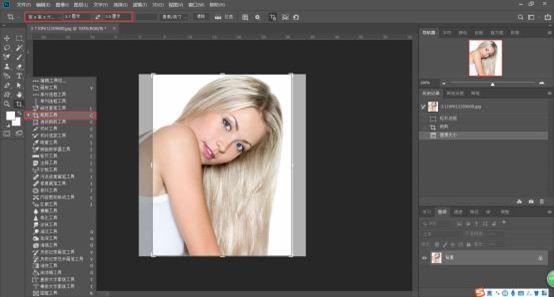
3. Chofoza: Isithombe (I)-Imodi (M)-Isikali Esimpunga (G). Chofoza: Susa umbala bese uguqula isithombe sibe mhlophe kancane.


4. Chofoza: Isithombe (I)-Ukulungiswa (J)-Ukukhanya kanye nokuqhathanisa (C).
Qaphela: Hlola Sebenzisa inguqulo endala, bese ulungisa ukukhanya kwesithombe ukuze wenze isithombe sicace.


5. Chofoza: Ifayela (F)-Gcina njenge-(A), khetha ifomethi ye-BMP njengefomethi yokugcina.


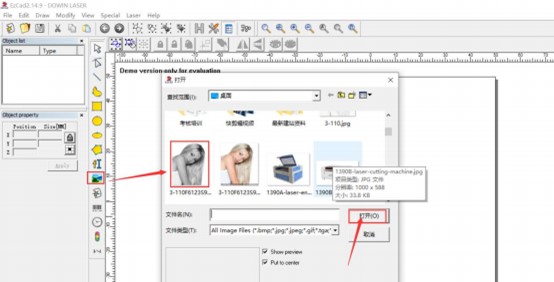
6. Sebenzisa isofthiwe yokumaka ye-laser ye-EZCAD ukuvula isithombe esicutshunguliwe.
7. Shintsha usayizi wokumaka, hlola:Fixed DIP, faka i-DPI: X=300, Y=300. Chofoza inkinobho ethi Extend, hlola:Invert, Dither, Lighten, bese uchofoza u-OK


8. Setha isivinini sokumaka: 800mm/s, Amandla: 40%, Imvamisa: 30KHz. Bese uchofoza Okubomvu (F1) ukuze ubonise indawo yokumaka, bese uchofoza inkinobho ethi Maka (F2) ukuze uqale ukumaka.


